Tutorial: Meadow Quest (2D RPG)
7. Pet, chest & victory
A dog that follows the hero, a treasure chest, and a WIN banner.
The pet
The dog sets its velocity toward the hero every frame, but only while it is more than 1.5 units away, so it trots behind you instead of sitting on your head. The engine's MoveByVelocity2D system then moves it, exactly as it moves everything else.
offset = hero - me
if length(offset) > 1.5: velocity = normalize(offset) x 3.5 else: velocity = 0- Create a 2D Sprite
Pet(imagemq-pet, Z-Order9, at (2, -9)). - Add Component > Velocity x,y. Now the sprite has a velocity for scripts to set and the engine to apply. No physics body is needed: it walks through walls, as pets do.
- Give it this script:
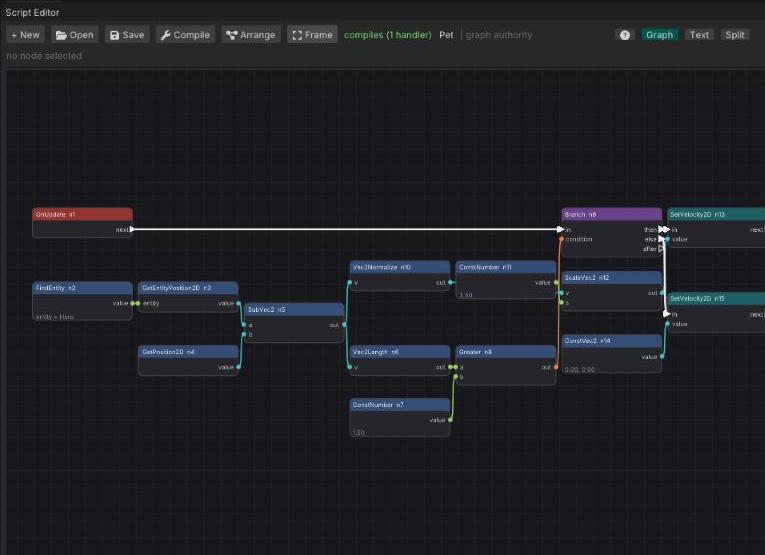
//!tgscript v1
//! script name=Pet
//! region graph
//! node 1 OnUpdate pos=(60,80)
export function onUpdate(ctx) {
    //! node 2 FindEntity pos=(60,220) entity=Hero
    const n2_value = ctx.findEntity("Hero");
    //! node 3 GetEntityPosition2D pos=(260,220)
    const n3_value = ctx.getEntityPosition2D(n2_value);
    //! node 4 GetPosition2D pos=(260,340)
    const n4_value = ctx.getPosition2D();
    //! node 5 SubVec2 pos=(460,260)
    const n5_out = ctx.subVec2(n3_value, n4_value);
    //! node 6 Vec2Length pos=(660,340)
    const n6_out = ctx.vec2Length(n5_out);
    //! node 7 ConstNumber pos=(660,440)
    const n7_value = 1.50;
    //! node 8 Greater pos=(860,340)
    const n8_out = (n6_out > n7_value);
    //! node 9 Branch pos=(1060,80)
    if (n8_out) {
        //! node 10 Vec2Normalize pos=(660,180)
        const n10_out = ctx.vec2Normalize(n5_out);
        //! node 11 ConstNumber pos=(860,180)
        const n11_value = 3.50;
        //! node 12 ScaleVec2 pos=(1060,200)
        const n12_out = ctx.scaleVec2(n10_out, n11_value);
        //! node 13 SetVelocity2D pos=(1260,80)
        ctx.setVelocity2D(n12_out);
    } else {
        //! node 14 ConstVec2 pos=(1060,320)
        const n14_value = ctx.vec2(0.00, 0.00);
        //! node 15 SetVelocity2D pos=(1260,240)
        ctx.setVelocity2D(n14_value);
    }
}
//! endregionThe chest
A 2D Sprite Chest (image mq-chest, scale 1 × 1, Z-Order 8) at (0, 6), north of the
gate. When the hero comes within 1 unit, it sets a global won to 1:
//!tgscript v1
//! script name=Chest
//! region graph
//! node 1 OnUpdate pos=(60,80)
export function onUpdate(ctx) {
    //! node 2 FindEntity pos=(260,80) entity=Hero
    const n2_value = ctx.findEntity("Hero");
    //! node 3 GetEntityPosition2D pos=(460,80)
    const n3_value = ctx.getEntityPosition2D(n2_value);
    //! node 4 GetPosition2D pos=(460,200)
    const n4_value = ctx.getPosition2D();
    //! node 5 Vec2Distance pos=(660,120)
    const n5_out = ctx.vec2Distance(n3_value, n4_value);
    //! node 6 ConstNumber pos=(660,240)
    const n6_value = 1.00;
    //! node 7 Less pos=(860,120)
    const n7_out = (n5_out < n6_value);
    //! node 8 Branch pos=(1060,80)
    if (n7_out) {
        //! node 9 ConstNumber pos=(1060,240)
        const n9_value = 1.00;
        //! node 10 SetGlobal pos=(1260,80) global=won
        ctx.setGlobal("won", n9_value);
    }
}
//! endregionThe WIN banner
A 2D Sprite WinBanner (image mq-win, Scale 4 × 2, since the image is 64×32 pixels,
Z-Order 50), parked far away at (200, 220). Once won is set, it moves to the camera,
just above the middle of the view:
//!tgscript v1
//! script name=WinBanner
//! region graph
//! node 1 OnUpdate pos=(60,80)
export function onUpdate(ctx) {
    //! node 2 GetGlobal pos=(260,120) global=won
    const n2_value = ctx.getGlobal("won");
    //! node 3 ConstNumber pos=(260,240)
    const n3_value = 0.50;
    //! node 4 Greater pos=(460,120)
    const n4_out = (n2_value > n3_value);
    //! node 5 Branch pos=(660,80)
    if (n4_out) {
        //! node 6 FindEntity pos=(660,240) entity=Camera
        const n6_value = ctx.findEntity("Camera");
        //! node 7 GetEntityPosition2D pos=(860,240)
        const n7_value = ctx.getEntityPosition2D(n6_value);
        //! node 8 ConstVec2 pos=(860,360)
        const n8_value = ctx.vec2(0.00, 1.00);
        //! node 9 AddVec2 pos=(1060,240)
        const n9_out = ctx.addVec2(n7_value, n8_value);
        //! node 10 SetPosition2D pos=(1260,80)
        ctx.setPosition2D(n9_out);
    }
}
//! endregionPlay the whole game
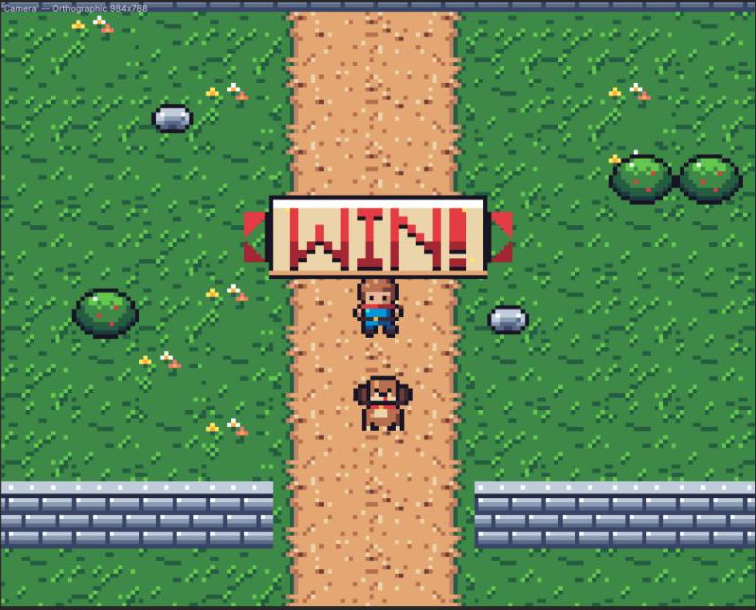
▶ Play: collect the three coins, walk through the opened gate, reach the chest, and you get WIN. ■ Stop and play again: everything resets.
Save with Ctrl+S. You've made a complete little 2D game in the browser.
Good practices
- Followers need a stop distance. Without the "only if farther than 1.5" check, the dog would sit on the hero and jitter.
- Move with velocity. Set a speed in units per second; the engine applies it every frame at the right rate, so you never multiply by DeltaTime yourself.
- Show UI where the player looks. The banner positions itself on the camera, not at a fixed spot in the world, so it is always on screen.
- One win flag (
won) that several scripts read keeps the logic easy to follow.
This part's assets
Pet.tgscript ·
Chest.tgscript ·
WinBanner.tgscript ·
mq-pet.png ·
mq-chest.png ·
mq-win.png (each image with its .mt).


