Tutorial: Meadow Quest (2D RPG)
5. Camera follow & walls
Make the camera follow the hero without showing past the map's edge, and put invisible colliders on the painted walls.
How to make the camera follow
A script on the camera looks up the hero by name every frame and moves to it, but clamps the position so the view never shows past the edge of the map.
OnUpdate ──▶ SetPosition2D( MakeVec2( Clamp(hero.x, −2.5, 2.5) , Clamp(hero.y, −6, 6) ) )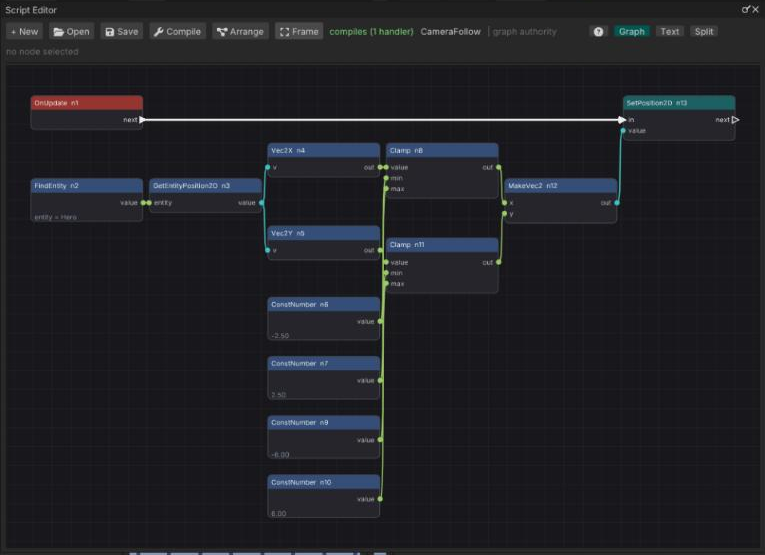
- Script Editor > + New, then
CameraFollow. Delete the demo nodes except OnUpdate. - Add FindEntity and set its
entitytoHeroin the strip above the canvas. - Add GetEntityPosition2D, Vec2X, Vec2Y, two Clamp nodes, four
ConstNumber nodes (
-2.5,2.5,-6,6), MakeVec2 and SetPosition2D. - Wire FindEntity → GetEntityPosition2D → Vec2X and → Vec2Y; Vec2X into the first
Clamp's
valuewith-2.5/2.5asmin/max; Vec2Y into the second with-6/6; both Clamps into MakeVec2x/y; MakeVec2 into SetPosition2Dvalue; and OnUpdate's exec into SetPosition2D. - Compile, Save, then select Camera and pick
CameraFollow.tgscriptin its Script slot.
Text version:
//!tgscript v1
//! script name=CameraFollow
//! region graph
//! node 1 OnUpdate pos=(60,80)
export function onUpdate(ctx) {
    //! node 2 FindEntity pos=(60,220) entity=Hero
    const n2_value = ctx.findEntity("Hero");
    //! node 3 GetEntityPosition2D pos=(260,220)
    const n3_value = ctx.getEntityPosition2D(n2_value);
    //! node 4 Vec2X pos=(460,160)
    const n4_out = ctx.vec2X(n3_value);
    //! node 5 Vec2Y pos=(460,300)
    const n5_out = ctx.vec2Y(n3_value);
    //! node 6 ConstNumber pos=(460,420)
    const n6_value = -2.50;
    //! node 7 ConstNumber pos=(460,520)
    const n7_value = 2.50;
    //! node 8 Clamp pos=(660,160)
    const n8_out = ctx.clamp(n4_out, n6_value, n7_value);
    //! node 9 ConstNumber pos=(460,620)
    const n9_value = -6.00;
    //! node 10 ConstNumber pos=(460,720)
    const n10_value = 6.00;
    //! node 11 Clamp pos=(660,320)
    const n11_out = ctx.clamp(n5_out, n9_value, n10_value);
    //! node 12 MakeVec2 pos=(860,220)
    const n12_out = ctx.makeVec2(n8_out, n11_out);
    //! node 13 SetPosition2D pos=(1060,80)
    ctx.setPosition2D(n12_out);
}
//! endregionHow to make the walls solid
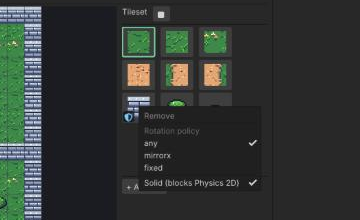
The walls are painted on the tilemap's Walls layer with the mq-wall tile. Mark that tile as
solid and every cell painted with it blocks Physics 2D bodies, such as the hero.
- Windows > Tilemap, Open…, and pick
meadow.tgtilemap. - In the Tileset, right-click the wall tile and tick Solid (blocks Physics 2D). A small badge appears on the tile.
- Save the tilemap.
Play and walk into a wall: the hero stops, flush against the stones. Neighbouring solid cells are merged into a few long boxes behind the scenes, so the hero slides smoothly along a wall.
Older editors: invisible colliders
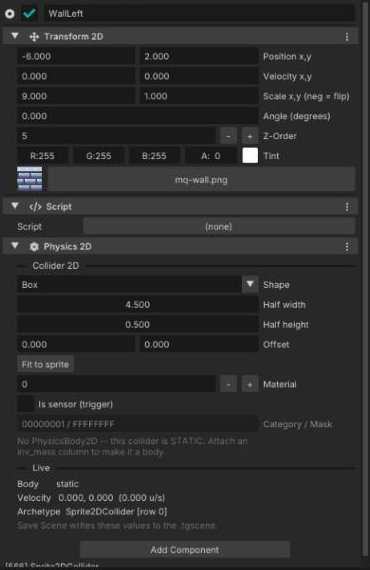
Without the Solid option, put an invisible collider on top of each wall: a 2D Sprite with a Collider 2D, made see-through.
| Name | Position | Scale |
|---|---|---|
WallLeft | −6, 2 | 9, 1 |
WallRight | 6, 2 | 9, 1 |
WallSouth | 0, −10 | 21, 1 |
WallNorth | 0, 10 | 21, 1 |
WallWest | −10, 0 | 1, 19 |
WallEast | 10, 0 | 1, 19 |
For each one:
- Right-click the Hierarchy, then 2D Sprite. Rename it (F2), set Position and Scale from the table.
- In Tint, double-click the A (alpha) field, type
0and press Enter. The sprite disappears; the painted wall shows through. - Add Component > Collider 2D, then in Physics 2D click Fit to sprite. Half
width and Half height become half the scale (for
WallLeft,4.5and0.5).
Make one wall, then right-click it and Duplicate for the others. When your editor gains Solid tiles, delete these six and mark the tile solid instead.
Good practices
- Collision follows the tiles. With a solid wall tile, repainting a wall moves its collision too; there is nothing to keep in step by hand.
- Only walls are solid. Grass, path and decorations stay walkable. A rock on the Decor layer could block too: mark the rock tile solid, and only the rock's cells block.
- Fewer, bigger colliders. The engine merges solid cells into long boxes; if you place colliders by hand, one 9×1 box is cheaper and smoother to slide along than nine 1×1 boxes.
- A collider without a Physics Body is static. The Inspector says so ("this collider is STATIC"): walls never move, only dynamic bodies such as the hero bump into them.
- Clamp the camera. Never let the player see the empty space past the edge of the map.
- Find by name, carefully.
FindEntitymatches the Hierarchy name exactly. If the camera doesn't move, check that the hero is calledHero.
This part's assets
CameraFollow.tgscript · meadow.tgtilemap. The downloads load in every editor, so the wall tile isn't marked solid there and the scene keeps the six invisible walls; on a newer editor, mark the tile solid and delete them.