Tutorial: The Village Gate (3D)
5. The gate
Reuse the coin pattern so the gate swings up out of the way when you approach.
The gate uses the same pattern as the coin, with two different numbers:
| VillageCoin | Gate | |
|---|---|---|
| trigger radius | 2 m → 4 | 5 m → 25 |
| where it goes | 0, -50, 0 (underground) | 0, 4.6, 6 (raised above the fence) |
The gate stands at 0, 1.5, 6. Raising it to y = 4.6 lifts its 3 m height clear of the
path, so it looks like a portcullis that has opened.
Make the script
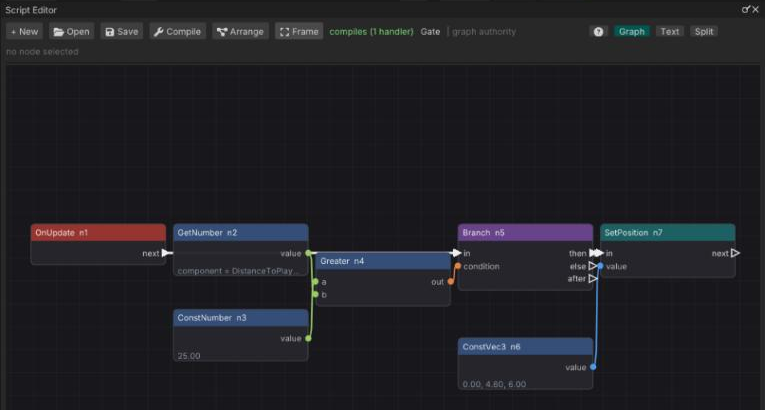
Script Editor > New, name it Gate, then in the Text tab:
//!tgscript v1
//! script name=Gate
//! region graph
//! node 1 OnUpdate pos=(60,80)
export function onUpdate(ctx) {
    //! node 2 GetNumber pos=(260,80) component=DistanceToPlayerSquare
    const n2_value = ctx.getNumber("DistanceToPlayerSquare");
    //! node 3 ConstNumber pos=(260,200)
    const n3_value = 25.00;
    //! node 4 Greater pos=(460,120)
    const n4_out = (n3_value > n2_value);
    //! node 5 Branch pos=(660,80)
    if (n4_out) {
        //! node 6 ConstVec3 pos=(660,240)
        const n6_value = ctx.vec3(0.00, 4.60, 6.00);
        //! node 7 SetPosition pos=(860,80)
        ctx.setPosition(n6_value);
    }
}
//! endregionCompile, Save, then select Gate in the Hierarchy and pick Gate.tgscript in its
Script slot. Save the scene.
Play-test
Walk towards the gate. In our test it rose when the player was about 4.4 m away, and it stays open, because nothing ever moves it back down. Press Stop to reset it.
Why absolute positions?
SetPosition sets where the object is, not how far to move it. So the target is written
out in full: 0, 4.6, 6 keeps the gate's own x and z. If you moved the gate in Part 3,
update the constant to match.
A smoother gate is possible: instead of SetPosition, use SetVelocity to make it slide
upward. You'd then need a second check to stop it, comparing its height with a limit, and
scripts can't yet pull the y out of a vector. Teleporting is the honest simple version.