Tutorial: The Village Gate (3D)
4. Collectible coins
Your first visual script. When the player gets within 2 metres, the coin vanishes.
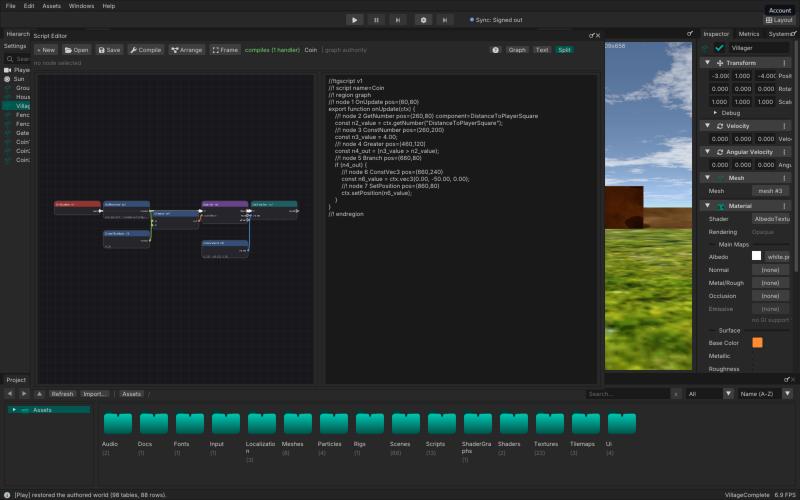
The idea
Every frame, each coin asks: "Is the player closer than 2 m?" If so, it moves itself 50 m underground, out of sight. That's "collected".
As a graph:
OnUpdate ──▶ Branch ──then──▶ SetPosition( 0, −50, 0 )
               ▲
    Greater( 4 , DistanceToPlayerSquare )
DistanceToPlayerSquare is the distance squared, so 2 m becomes 2 × 2 = 4.
Build it with nodes
- Windows > Script Editor, then New. Name it
VillageCoin. The editor createsAssets/Scripts/VillageCoin.tgscriptwith a starter graph. - Select all the starter nodes and delete them, keeping only OnUpdate.
- Press Space, search for GetNumber, and add it. In its attribute field, enter
DistanceToPlayerSquare. - Add a ConstNumber and set it to
4. - Add Greater. Wire ConstNumber → a and GetNumber → b. It now answers "4 > distance²".
- Add Branch. Wire OnUpdate's white exec output to Branch's input, and Greater → condition.
- Add ConstVec3 =
0, -50, 0, and SetPosition. Wire Branch's then to SetPosition, and ConstVec3 to SetPosition's value. - Compile. The status should read compiles (1 handler). Then Save.
…or paste it as text
Switch the Script Editor to the Text tab, select everything, and paste:
//!tgscript v1
//! script name=VillageCoin
//! region graph
//! node 1 OnUpdate pos=(60,80)
export function onUpdate(ctx) {
    //! node 2 GetNumber pos=(260,80) component=DistanceToPlayerSquare
    const n2_value = ctx.getNumber("DistanceToPlayerSquare");
    //! node 3 ConstNumber pos=(260,200)
    const n3_value = 4.00;
    //! node 4 Greater pos=(460,120)
    const n4_out = (n3_value > n2_value);
    //! node 5 Branch pos=(660,80)
    if (n4_out) {
        //! node 6 ConstVec3 pos=(660,240)
        const n6_value = ctx.vec3(0.00, -50.00, 0.00);
        //! node 7 SetPosition pos=(860,80)
        ctx.setPosition(n6_value);
    }
}
//! endregion
Switch back to Graph, and the same seven nodes are there, wired. Compile, Save.
Attach it to the coins
- Select Coin1 in the Hierarchy.
- In the Inspector, scroll to Script, click the (none) slot, and pick VillageCoin.tgscript.
- Repeat for Coin2 and Coin3. One script serves all three.
- Save the scene.
Play-test
Press Play, put the mouse over the Simulation panel, and walk north through the gate (it's still closed, but you can walk through it for now). Walk into a coin. It disappears.
When we tested this, a coin vanished once the player came within about 1.6 m: the camera is at eye height (1.6 m) and the coin at 0.8 m, so part of the 2 m is vertical.
Press Stop, and all coins come back.