Publishing on Trisgine Play
Create a company or group
Set up the team your games belong to on Trisgine Play, and ask for the right to publish.
Open the Developer section
Sign in at play.trisgine.com (the person icon at the top right, then Sign in). Once you're signed in, the top bar shows Developer section.
- If you don't belong to a company or group yet, it offers to create one.
- If you belong to several, it asks you to Choose a company or group. The one you pick is where Developer section takes you next time. Switch company or group (top right of every developer page) brings the list back.
Create a group
- Choose Group under What are you creating?
- Type a Group name.
- Click Create group.
You land on the group's Overview. You are its Group admin.
A new group can already create games, build them and edit their store pages, but it can't publish them yet. Click Request publishing rights on the Overview: the page then reads "Requested on (date). A Trisgram admin will decide." You can keep working on your game in the meantime.
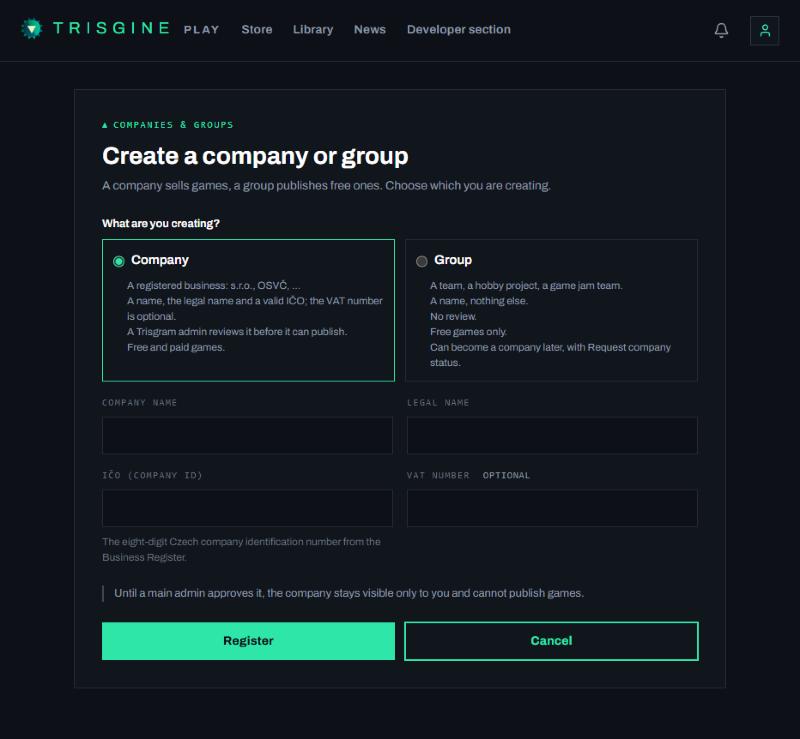
Register a company
- Choose Company.
- Fill in Company name, Legal name, and IČO (company ID), the eight-digit Czech company identification number from the Business Register. VAT number is optional.
- Click Register.
Until a Trisgram admin approves it, the company is visible only to you and can't publish games. Once it is approved, it gets a public studio page in the store, and can sell games, set prices, generate product keys and grant access.
Company profile
A company admin fills in the public studio page under Settings: Display name, Tagline, Description, Accent colour, Public address, plus a Banner and an Avatar image (PNG, JPEG, GIF or WebP). One account can create up to 5 companies and groups in total.
The Overview page
| Section | What it shows |
|---|---|
| Publishing games | whether this team may publish, and the request button if not |
| Games | how many games are in Draft, In review, Published and Withdrawn, plus New game |
| Builds waiting for live | web builds newer than what each game's live channel serves |
Next: create a game →