Tutorial: Meadow Quest (2D RPG)
14. Game over & restart
Replace respawning with a GAME OVER plaque, freeze the game for a moment, and restart the whole scene with LoadScene.
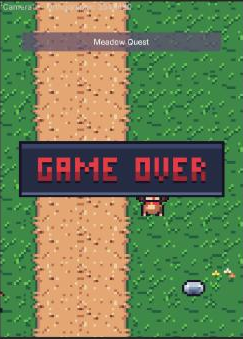
So far, losing your last heart just put the hero back at the start. Now losing means something: everything stops, a GAME OVER plaque appears, and after two and a half seconds the whole scene starts again from the title screen, with three hearts, no sword and every coin back in place.
How to build it
- Remove the respawn from
Health. Open it in the Script Editor, select the Branch that moves the hero to (0, −8) and setshpto 3, together with its Less and And condition nodes and the five nodes in its then branch, and press Delete. Hearts and potions stay as they are. - The plaque: a 2D Sprite
GameOverBanner, imagemq-gameover, Scale6,2(the image is 96×32 pixels), Z-Order55, parked at (200, 310). - Give it this script,
GameOver:
OnUpdate ─▶ Branch( hp < 0.5  And  started > 0.5 )
              then ─▶ SetGlobal started = 0          (the hero and the slimes stop)
                   ─▶ SetGlobal over = 1             (keeps the title card away)
                   ─▶ SetVar overAt = Time
                   ─▶ PlayAudio( SfxHurt )
         ─▶ Branch( GetVar overAt > 0.5 )
              then ─▶ SetPosition2D( camera position )   (show the plaque)
                   ─▶ Branch( Time > overAt + 2.5 )  then ─▶ LoadScene ""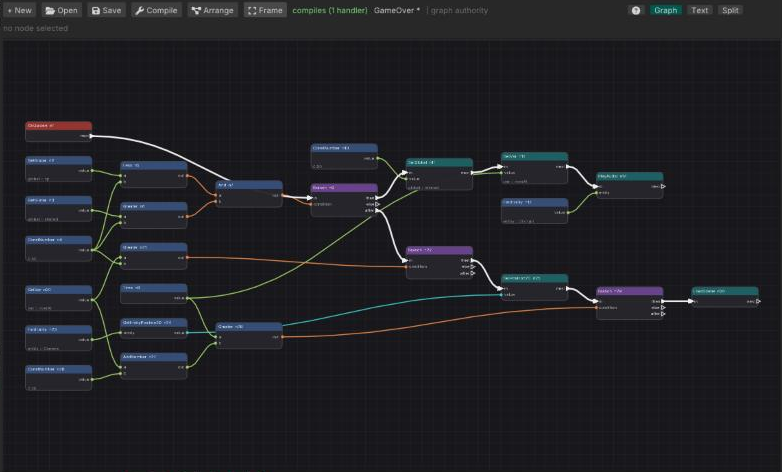
//!tgscript v1
//! script name=GameOver
//! region graph
//! node 1 OnUpdate pos=(60,80)
export function onUpdate(ctx) {
    //! node 2 GetGlobal pos=(60,220) global=hp
    const n2_value = ctx.getGlobal("hp");
    //! node 3 GetGlobal pos=(60,320) global=started
    const n3_value = ctx.getGlobal("started");
    //! node 4 ConstNumber pos=(60,420)
    const n4_value = 0.50;
    //! node 5 Less pos=(260,220)
    const n5_out = (n2_value < n4_value);
    //! node 6 Greater pos=(260,320)
    const n6_out = (n3_value > n4_value);
    //! node 7 And pos=(460,260)
    const n7_out = (n5_out && n6_out);
    //! node 8 Time pos=(60,520)
    const n8_value = ctx.time();
    //! node 9 Branch pos=(660,80)
    if (n7_out) {
        //! node 10 ConstNumber pos=(660,240)
        const n10_value = 0.00;
        //! node 11 SetGlobal pos=(860,80) global=started
        ctx.setGlobal("started", n10_value);
        //! node 12 SetVar pos=(1060,80) var=overAt
        ctx.setVar("overAt", n8_value);
        //! node 13 FindEntity pos=(1060,240) entity=SfxHurt
        const n13_value = ctx.findEntity("SfxHurt");
        //! node 14 PlayAudio pos=(1260,80)
        ctx.playAudio(n13_value);
        //! node 15 ConstNumber pos=(1260,240)
        const n15_value = 1.00;
        //! node 16 SetGlobal pos=(1460,80) global=over
        ctx.setGlobal("over", n15_value);
    }
    //! node 20 GetVar pos=(60,720) var=overAt
    const n20_value = ctx.getVar("overAt");
    //! node 21 Greater pos=(260,720)
    const n21_out = (n20_value > n4_value);
    //! node 22 Branch pos=(1460,80)
    if (n21_out) {
        //! node 23 FindEntity pos=(1460,240) entity=Camera
        const n23_value = ctx.findEntity("Camera");
        //! node 24 GetEntityPosition2D pos=(1660,240)
        const n24_value = ctx.getEntityPosition2D(n23_value);
        //! node 25 SetPosition2D pos=(1860,80)
        ctx.setPosition2D(n24_value);
        //! node 26 ConstNumber pos=(1660,360)
        const n26_value = 2.50;
        //! node 27 AddNumber pos=(1860,360)
        const n27_out = (n20_value + n26_value);
        //! node 28 Greater pos=(2060,320)
        const n28_out = (n8_value > n27_out);
        //! node 29 Branch pos=(2260,80)
        if (n28_out) {
            //! node 30 LoadScene pos=(2460,80) scene=""
            ctx.loadScene("");
        }
    }
}
//! endregion- Keep the title card away.
startedis 0 again during GAME OVER, soTitleScreenwould put the title card back over the plaque. InTitleScreen, add GetGlobalover, Less (0.5) and And them with the existingstarted < 0.5before its Branch. - Quiet farmer on the title screen. In
Farmer, And the "near" check withstarted > 0.5, so his bubble doesn't pop up over the title and Space on the title doesn't hand you the sword.
LoadScene with an empty scene attribute reloads the scene that is running. In the editor it
restarts Play; in a published game it loads the scene again. Either way every global and
per-entity variable starts from zero, and OnStart gives the hero three hearts.
Play, press Space, and let the slimes win.
Good practices
- Freeze before you restart. Setting
startedto 0 stops the hero and the slimes, because their scripts already check it. The player sees what happened instead of being hit again. - Give the player a moment. Two and a half seconds is enough to read GAME OVER and short enough not to annoy. Make it a constant you can tune.
- One flag per state.
startedmeans "playing";overmeans "showing GAME OVER". Reusing one flag for both is how the title card ended up on top of the plaque. - Run the trigger once. The first Branch fires only while
startedis 1, and it sets it to 0, sooverAtis stored once and the restart time doesn't move. - Restart with the scene, not by hand. Resetting every coin, slime and variable by script is long and easy to get wrong; reloading the scene resets everything you authored.
- In the editor, LoadScene only restarts the open scene. Loading a different scene from a script works in a published game, but the editor refuses it so your open scene isn't replaced.
This part's assets
GameOver.tgscript ·
Health.tgscript ·
TitleScreen.tgscript ·
Farmer.tgscript ·
mq-gameover.png (the image with its .mt).
