Logic & UI
Localization
Translate UI text into several languages with @keys and per-language tables, and switch language in the editor.
How it works
- UI Text whose string starts with
@is a key, not text:@menu.newgameshows "New Game" in English and "Neues Spiel" in German. - Each language is one table in
Assets/Localization/, named by its code:en.tgloc,de.tgloc, and so on. English (en) is the master list of keys; add a key there first. - A key missing from the active language falls back to the English text. A key missing
everywhere shows as
⟪key⟫, so it's easy to spot. - Translations travel as CSV (
key,en,de,…, one row per key); the tables themselves are a compact binary format you don't edit by hand. Project > Import refuses.csvand.tglocfiles; use the Localization panel.
The Localization panel
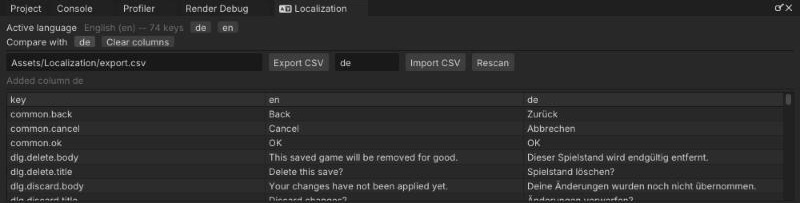
Open Windows > Localization.
| Part | What it does |
|---|---|
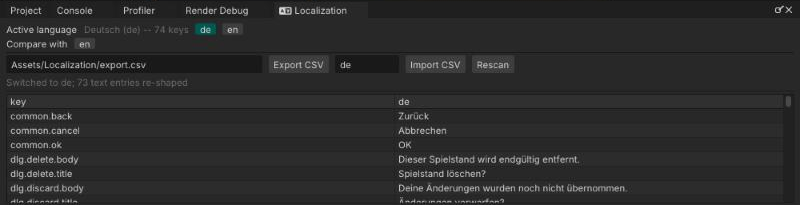
| Active language | the language the editor shows now, its key count, and a button per available language. Click one to switch: every @key text on screen changes at once. |
| Compare with | adds another language as an extra column in the grid, side by side. Clear columns removes them. |
| path, Export CSV | saves the grid (the key, the active language and any compared columns) as CSV: the web editor downloads it, the desktop editor writes it to the path |
| language code, All columns, Import CSV… | imports the column with that code, or every language column with All columns ticked: the web editor opens a file chooser, the desktop editor reads the path. Each imported column replaces that language's table |
| Rescan | looks for new language tables |
| the grid | every key with its text; (missing) marks a key without a translation |
How to translate a game
- Write your UI texts as keys: in a Text element's Text Style box type
@title.startinstead ofStart. Use dotted names by screen or topic (menu.…,hud.…,dlg.…). - Keep en active, Compare with every other language, and Export CSV to get the whole table.
- Add your keys as rows, and a column per new language (for example
csfor Czech), in any spreadsheet. Keep the first columnkeyand the column names equal to the language codes. Save as CSV, UTF-8. - Tick All columns and click Import CSV…. A new language appears under Active language; click it to check.
Switching language in the game
The panel switches the language in the editor. For players, a dropdown wired to the built-in
game-menu system switches it; Meadow Quest's menu shows how. A script's
SetText can show keys (@quest.talk), see Part 16.
Good practices
- Never type player-facing text directly in a game you might translate: use a key from the start. Retrofitting keys later means touching every screen.
- Keep
encomplete. It's the fallback for every other language, so a missing English string shows as⟪key⟫everywhere. - Leave room. German and Czech strings are often a third longer than English; size buttons and boxes for the longest language, or use Overflow: Wrap in Text Style.
- Text painted into images can't be translated. Speech bubbles drawn as sprites (as in Meadow Quest) stay in the language they were painted in.
- Check with Compare. Add the other languages as columns and look for
(missing)before you publish.