Tutorial: The Village Gate (3D)
6. The villager
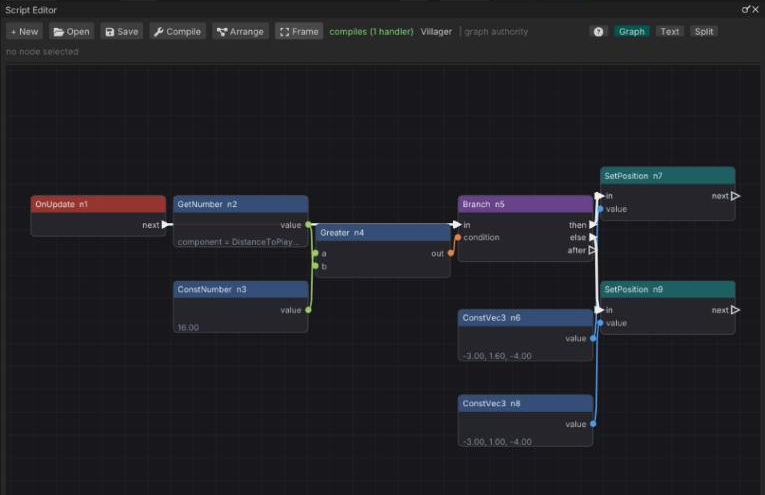
A Branch with both "then" and "else", so the villager hops up when you're near and settles back when you leave.
The coin and the gate only ever react once. The villager should react while you're near and stop when you walk away, so we use both of the Branch's outputs.
                      ┌─then──▶ SetPosition( -3, 1.6, -4 )   (on tiptoe)
OnUpdate ──▶ Branch ──┤
                      └─else──▶ SetPosition( -3, 1.0, -4 )   (feet on the ground)
condition: 16 > DistanceToPlayerSquare (within 4 m)Make the script
Script Editor > New, name it Villager, and paste into Text:
tgscript
//!tgscript v1
//! script name=Villager
//! region graph
//! node 1 OnUpdate pos=(60,80)
export function onUpdate(ctx) {
    //! node 2 GetNumber pos=(260,80) component=DistanceToPlayerSquare
    const n2_value = ctx.getNumber("DistanceToPlayerSquare");
    //! node 3 ConstNumber pos=(260,200)
    const n3_value = 16.00;
    //! node 4 Greater pos=(460,120)
    const n4_out = (n3_value > n2_value);
    //! node 5 Branch pos=(660,80)
    if (n4_out) {
        //! node 6 ConstVec3 pos=(660,240)
        const n6_value = ctx.vec3(-3.00, 1.60, -4.00);
        //! node 7 SetPosition pos=(860,40)
        ctx.setPosition(n6_value);
    } else {
        //! node 8 ConstVec3 pos=(660,360)
        const n8_value = ctx.vec3(-3.00, 1.00, -4.00);
        //! node 9 SetPosition pos=(860,200)
        ctx.setPosition(n8_value);
    }
}
//! endregion
In the Graph tab, the Branch now has wires leaving from both then and else.
Compile, Save, then attach Villager.tgscript to Villager. Save the scene.
Play-test
Walk up the path. About 4 m from the villager (we measured it starting at 6.9 m out along the path, which is about 4 m in a straight line), they pop up 0.6 m. Back away and they drop back down.
Ideas to try
- Make the villager hop higher, or lower the trigger radius to
9(3 m). - Give the house's door a "creak open" with the same then/else trick.
- Duplicate the villager, move the copy, and remember that the script has the position written into it. You'll need a second script with the new numbers.