Tutorial: Meadow Quest (2D RPG)
12. Sound effects & trigger pickups
Turn the coins and the potion into triggers that react the moment the hero touches them, and play a sound for every pickup, swing, hit and gate.
Two upgrades in one part. The coins and the potion stop measuring distances every frame and become triggers, and the game gets sound effects: a chime for pickups, a whoosh for the sword, a thud when a slime hits you, a pop when one is defeated, a fanfare for the gate and a gulp for the potion.
Triggers instead of distance checks
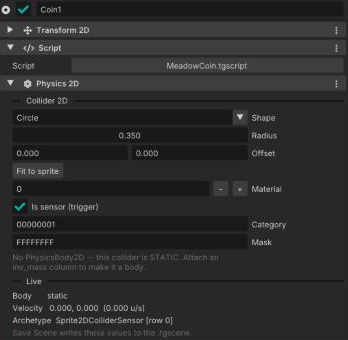
A trigger (a sensor collider) blocks nothing. Instead, the physics step tells the scripts on both sides when a body enters or leaves it, through the OnTriggerEnter and OnTriggerExit events. The hero already has a Physics Body 2D (Part 3), so a coin only needs a collider marked as a sensor; it stays static.
- Select Coin1. Add Component > Collider 2D.
- In Physics 2D > Collider 2D: Shape
Circle, Radius0.35, and tick Is sensor (trigger). - Do the same for Coin2, Coin3 and the Potion.
Now rewrite MeadowCoin. OnTriggerEnter replaces OnUpdate, and ContactOther (the entity
that touched the coin) replaces the distance check:
OnTriggerEnter ─▶ Branch( ContactOther == FindEntity Hero )
                   then ─▶ SetGlobal coins = GetGlobal coins + 1
                        ─▶ PlayAudio( FindEntity SfxCoin )
                        ─▶ SetPosition2D( 200 , 200 )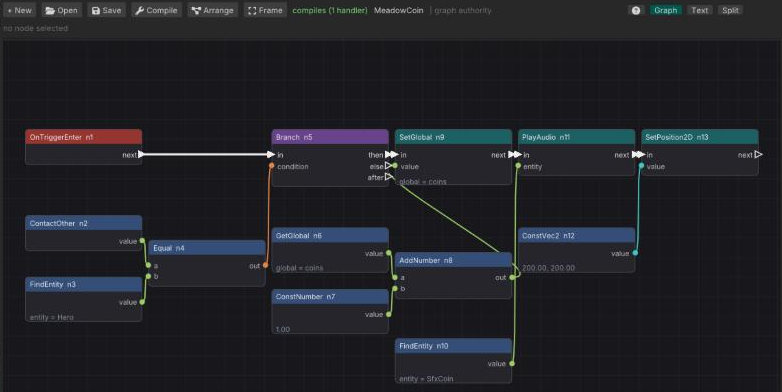
//!tgscript v1
//! script name=MeadowCoin
//! region graph
//! node 1 OnTriggerEnter pos=(60,80)
export function onTriggerEnter(ctx) {
    //! node 2 ContactOther pos=(60,220)
    const n2_value = ctx.contactOther();
    //! node 3 FindEntity pos=(60,320) entity=Hero
    const n3_value = ctx.findEntity("Hero");
    //! node 4 Equal pos=(260,260)
    const n4_out = (n2_value === n3_value);
    //! node 5 Branch pos=(460,80)
    if (n4_out) {
        //! node 6 GetGlobal pos=(460,240) global=coins
        const n6_value = ctx.getGlobal("coins");
        //! node 7 ConstNumber pos=(460,340)
        const n7_value = 1.00;
        //! node 8 AddNumber pos=(660,280)
        const n8_out = (n6_value + n7_value);
        //! node 9 SetGlobal pos=(660,80) global=coins
        ctx.setGlobal("coins", n8_out);
        //! node 10 FindEntity pos=(660,420) entity=SfxCoin
        const n10_value = ctx.findEntity("SfxCoin");
        //! node 11 PlayAudio pos=(860,80)
        ctx.playAudio(n10_value);
        //! node 12 ConstVec2 pos=(860,240)
        const n12_value = ctx.vec2(200.00, 200.00);
        //! node 13 SetPosition2D pos=(1060,80)
        ctx.setPosition2D(n12_value);
    }
}
//! endregion
The potion's script is the same graph with potions instead of coins and its own parking spot:
//!tgscript v1
//! script name=Potion
//! region graph
//! node 1 OnTriggerEnter pos=(60,80)
export function onTriggerEnter(ctx) {
    //! node 2 ContactOther pos=(60,220)
    const n2_value = ctx.contactOther();
    //! node 3 FindEntity pos=(60,320) entity=Hero
    const n3_value = ctx.findEntity("Hero");
    //! node 4 Equal pos=(260,260)
    const n4_out = (n2_value === n3_value);
    //! node 5 Branch pos=(460,80)
    if (n4_out) {
        //! node 6 GetGlobal pos=(460,240) global=potions
        const n6_value = ctx.getGlobal("potions");
        //! node 7 ConstNumber pos=(460,340)
        const n7_value = 1.00;
        //! node 8 AddNumber pos=(660,280)
        const n8_out = (n6_value + n7_value);
        //! node 9 SetGlobal pos=(660,80) global=potions
        ctx.setGlobal("potions", n8_out);
        //! node 10 FindEntity pos=(660,420) entity=SfxCoin
        const n10_value = ctx.findEntity("SfxCoin");
        //! node 11 PlayAudio pos=(860,80)
        ctx.playAudio(n10_value);
        //! node 12 ConstVec2 pos=(860,240)
        const n12_value = ctx.vec2(200.00, 270.00);
        //! node 13 SetPosition2D pos=(1060,80)
        ctx.setPosition2D(n12_value);
    }
}
//! endregionSound effects
Each sound is its own Audio Source entity, started by a script with PlayAudio.
| Entity | Clip | Played by |
|---|---|---|
SfxCoin | mq-sfx-coin.wav | MeadowCoin, Potion (pickup) |
SfxSwing | mq-sfx-swing.wav | Sword (swing) |
SfxHurt | mq-sfx-hurt.wav | Slime (a hit), GameOver |
SfxDefeat | mq-sfx-defeat.wav | Slime (defeated) |
SfxGate | mq-sfx-gate.wav | Gate (opens) |
SfxDrink | mq-sfx-drink.wav | Health (potion drunk) |
How to make one
- Project > Import… the
.wavfiles from this part's assets intoAssets/Audio(with their.mtfiles). - Right-click the Hierarchy, then Audio Source. Rename it
SfxCoin. - In Audio Source, click Choose clip… and pick
mq-sfx-coin.wav. - Set Gain
0.8, Att Min100and Att Max200, like the music: the sound is equally loud wherever the camera is. - Untick Loop and Autoplay: it plays only when a script asks.
- Add Component > Script and give it this tiny script,
Sfx:
//!tgscript v1
//! script name=Sfx
//! region graph
//! node 1 OnStart pos=(60,80)
export function onStart(ctx) {
    //! node 2 StopAudio pos=(260,80)
    ctx.stopAudio(/*!unconnected*/ 0);
}
//! endregion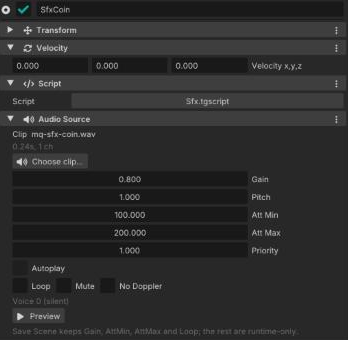
- Select
SfxCoin, press Ctrl+D five times, and give each copy its name and clip from the table.
Playing them
PlayAudio plays the Audio Source of the entity wired into it. Add two nodes where the event happens: FindEntity (the sound's name) → PlayAudio.
| Script | Where | Sound |
|---|---|---|
Sword | after SetVar swingAt, in the Branch that starts a swing | SfxSwing |
Slime | after SetPosition2D in the defeated Branch | SfxDefeat |
Slime | after SetEntityPosition2D in the hit Branch (the knockback) | SfxHurt |
Health | after the last SetGlobal potions (drinking) | SfxDrink |
The gate needs one more idea. Its old graph moved it away on every frame once you had three coins;
a sound there would restart every frame. A per-entity variable, open, makes it happen once:
OnUpdate ─▶ Branch( coins >= 3  And  GetVar open < 0.5 )
then ─▶ SetVar open = 1 ─▶ PlayAudio( SfxGate ) ─▶ SetPosition2D( 200 , 210 )//!tgscript v1
//! script name=Gate
//! region graph
//! node 1 OnUpdate pos=(60,80)
export function onUpdate(ctx) {
//! node 2 GetGlobal pos=(60,220) global=coins
const n2_value = ctx.getGlobal("coins");
//! node 3 ConstNumber pos=(60,320)
const n3_value = 3.00;
//! node 4 GreaterEqual pos=(260,260)
const n4_out = (n2_value >= n3_value);
//! node 5 GetVar pos=(60,420) var=open
const n5_value = ctx.getVar("open");
//! node 6 ConstNumber pos=(60,520)
const n6_value = 0.50;
//! node 7 Less pos=(260,460)
const n7_out = (n5_value < n6_value);
//! node 8 And pos=(460,360)
const n8_out = (n4_out && n7_out);
//! node 9 Branch pos=(660,80)
if (n8_out) {
//! node 10 ConstNumber pos=(660,240)
const n10_value = 1.00;
//! node 11 SetVar pos=(860,80) var=open
ctx.setVar("open", n10_value);
//! node 12 FindEntity pos=(860,240) entity=SfxGate
const n12_value = ctx.findEntity("SfxGate");
//! node 13 PlayAudio pos=(1060,80)
ctx.playAudio(n12_value);
//! node 14 ConstVec2 pos=(1060,240)
const n14_value = ctx.vec2(200.00, 210.00);
//! node 15 SetPosition2D pos=(1260,80)
ctx.setPosition2D(n14_value);
}
}
//! endregionPlay and collect a coin: you hear it.
Good practices
- Triggers for pickups, distances for "near". A pickup happens on contact, so a trigger is exact and costs nothing between contacts. "Is the hero close enough to talk?" (the farmer) is a range, not a contact, so a distance check is still right there.
- Check who touched you. Slimes and the dog can touch a coin too; comparing ContactOther with the hero keeps them from collecting it.
- Play a sound on an event, never every frame. A trigger, a key press or a state change (the
gate's
open) fires once. A sound started every frame restarts every frame. - One entity per sound, named by purpose.
SfxHurtsays what it is for; scripts find it by that name, so you can swap the clip without touching a graph. - Keep effects short and below the music. These are 0.1 to 0.5 seconds long at gain 0.8 against music at 0.5. Generate or record them at the same sample rate as the music.
This part's assets
MeadowCoin.tgscript · Potion.tgscript · Gate.tgscript · Sfx.tgscript · Sword.tgscript · Slime.tgscript · Health.tgscript
Sounds (each with its .mt):
mq-sfx-coin.wav ·
mq-sfx-swing.wav ·
mq-sfx-hurt.wav ·
mq-sfx-defeat.wav ·
mq-sfx-gate.wav ·
mq-sfx-drink.wav