Building 2D games
Pixel Art editor
Painting sprites and textures in the browser, with layers, animation frames, palettes and optional AI generation.
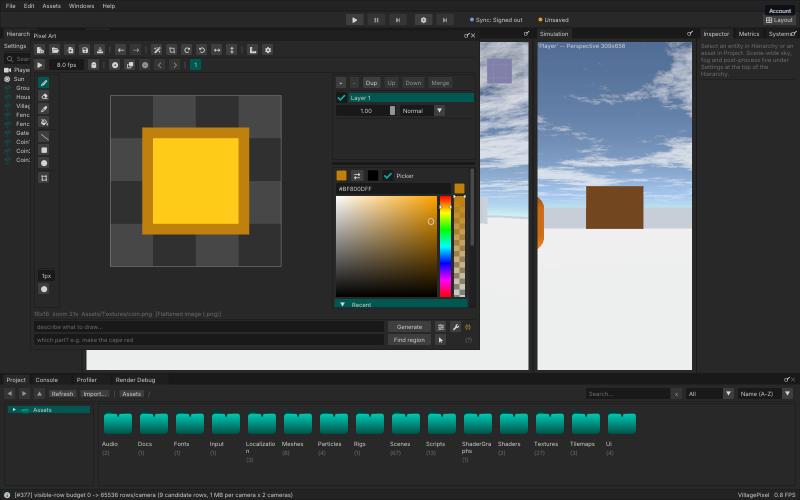
Open it from Windows > Pixel Art, or double-click any image in the Project panel.
Canvas and tools
| Tool | Does |
|---|---|
| Pencil | paint single pixels (brush size with [ ]) |
| Eraser | clear to transparent |
| Picker | pick a colour from the canvas |
| Flood fill | fill a connected area |
| Line / Rectangle / Ellipse | shapes (outline or filled) |
| Select | marquee. Ctrl+C / Ctrl+V paste as a floating selection; Enter commits |
The right side has the layer stack (opacity, blend mode, Dup / Up / Down / Merge) and the
colour picker with hex input, recent colours and shades. Palettes load and save as
GIMP .gpl files.
Also available:
- Mirror modes: paint symmetrically, horizontally, vertically or diagonally.
- Tile preview: shows the image repeated, to check that a texture tiles seamlessly.
- Autosave: keeps a recovery copy while you work.
Animation
The frame strip under the canvas adds, duplicates, removes and reorders frames. Onion skin shows the neighbouring frames, the fps field sets the speed, and Space plays it.
Saving
| Save as | Use for |
|---|---|
| Layered (.tgpx) | keep layers and frames for later editing |
| Flattened image (.png) | a texture for materials, sprites or tiles |
| Flipbook strip (.png) | all frames side by side, ready for sprite animation |
| Sprite sheet (.png) | frames in a grid |
A saved .png gets a UUID immediately, and any material or sprite using it updates live.
AI generation (optional)
The bottom of the window has a prompt field ("describe what to draw…") and a Generate button. They talk to an image model you run yourself (ComfyUI), and a second field ("which part? e.g. make the cape red") uses a local language model (Ollama) to pick a region to recolour. Setup and tips: Pixel art generation.