Tutorial: Meadow Quest (2D RPG)
16. Languages
Translate the quest line into German with your own localization keys, a CSV round trip through the Localization panel, and a separate number element.
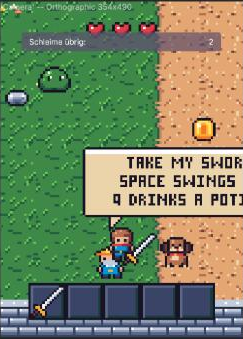
The menu already switches the engine's own words. Now the quest line follows: in German it says Sprich mit dem Bauern and Schleime übrig: 2.
How it works
- A UI text that starts with
@is a key:@quest.talkshows the active language's text forquest.talk. SetText accepts keys too. - Each language is one table:
en.tgloc,de.tgloc. English is the master list; a key missing in German falls back to English. - You edit tables as CSV (
key,en,de) in any spreadsheet, round trip through the Localization panel.
How to add the keys
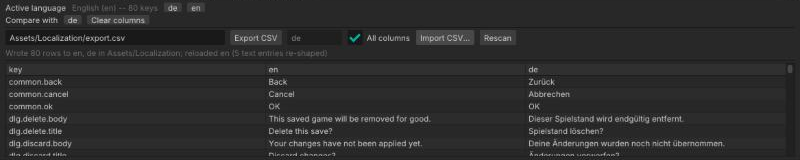
- Windows > Localization. Under Active language keep en, and under Compare with click de, so both languages are in the grid.
- Click Export CSV. The browser downloads
export.csvwith every key the project has. - Open it in a spreadsheet and add these rows at the end. Save it as CSV, UTF-8.
| key | en | de |
|---|---|---|
quest.chest | Open the chest! | Öffne die Truhe! |
quest.coins | Coins to find: | Münzen übrig: |
quest.slimes | Slimes left: | Schleime übrig: |
quest.talk | Talk to the farmer | Sprich mit dem Bauern |
quest.title | Meadow Quest | Meadow Quest |
quest.won | You did it! | Geschafft! |
- Tick All columns, click Import CSV… and pick the file. The status line confirms Wrote 80 rows to en, de… reloaded en, and the new keys appear in the grid.
How to use them
SetTextNumber's prefix is plain text, never a key, so the number gets its own element:
- In
QuestPanel, changeQuestTextto the middle-left anchor preset, Pos X24, Width500, Height48, left-aligned, text@quest.title. - Add a second UI > Text,
QuestCount: middle-right, Pos X-24, Width80, right-aligned, text a single space. - Rewrite
Quest: SetText writes keys intoQuestText, and SetTextNumber with an empty prefix writes the count intoQuestCount(other lines clear it with a space).
tgscript
//!tgscript v1
//! script name=Quest
//! region graph
//! node 1 OnUpdate pos=(60,80)
export function onUpdate(ctx) {
    //! node 2 FindEntity pos=(60,220) entity=QuestText
    const n2_value = ctx.findEntity("QuestText");
    //! node 40 FindEntity pos=(60,320) entity=QuestCount
    const n40_value = ctx.findEntity("QuestCount");
    //! node 3 GetGlobal pos=(60,420) global=hasSword
    const n3_value = ctx.getGlobal("hasSword");
    //! node 4 GetGlobal pos=(60,520) global=slain
    const n4_value = ctx.getGlobal("slain");
    //! node 5 GetGlobal pos=(60,620) global=coins
    const n5_value = ctx.getGlobal("coins");
    //! node 6 GetGlobal pos=(60,720) global=won
    const n6_value = ctx.getGlobal("won");
    //! node 7 ConstNumber pos=(60,820)
    const n7_value = 0.50;
    //! node 8 ConstNumber pos=(60,920)
    const n8_value = 2.00;
    //! node 9 ConstNumber pos=(60,1020)
    const n9_value = 3.00;
    //! node 30 GetGlobal pos=(60,1120) global=started
    const n30_value = ctx.getGlobal("started");
    //! node 10 Less pos=(260,420)
    const n10_out = (n3_value < n7_value);
    //! node 11 Less pos=(260,520)
    const n11_out = (n4_value < n8_value);
    //! node 12 Less pos=(260,620)
    const n12_out = (n5_value < n9_value);
    //! node 13 Less pos=(260,720)
    const n13_out = (n6_value < n7_value);
    //! node 31 Less pos=(260,1120)
    const n31_out = (n30_value < n7_value);
    //! node 32 Branch pos=(460,80)
    if (n31_out) {
        //! node 33 SetText pos=(660,80) text="@quest.title"
        ctx.setText("@quest.title", n2_value);
        //! node 34 SetText pos=(860,80) text=" "
        ctx.setText(" ", n40_value);
    } else {
        //! node 14 Branch pos=(660,240)
        if (n10_out) {
            //! node 15 SetText pos=(860,240) text="@quest.talk"
            ctx.setText("@quest.talk", n2_value);
            //! node 35 SetText pos=(1060,240) text=" "
            ctx.setText(" ", n40_value);
        } else {
            //! node 16 Branch pos=(860,400)
            if (n11_out) {
                //! node 41 SetText pos=(1060,400) text="@quest.slimes"
                ctx.setText("@quest.slimes", n2_value);
                //! node 17 SubNumber pos=(1060,560)
                const n17_out = (n8_value - n4_value);
                //! node 18 SetTextNumber pos=(1260,400) prefix=""
                ctx.setTextNumber("", n40_value, n17_out);
            } else {
                //! node 19 Branch pos=(1060,720)
                if (n12_out) {
                    //! node 42 SetText pos=(1260,720) text="@quest.coins"
                    ctx.setText("@quest.coins", n2_value);
                    //! node 20 SubNumber pos=(1260,880)
                    const n20_out = (n9_value - n5_value);
                    //! node 21 SetTextNumber pos=(1460,720) prefix=""
                    ctx.setTextNumber("", n40_value, n20_out);
                } else {
                    //! node 22 Branch pos=(1260,1040)
                    if (n13_out) {
                        //! node 23 SetText pos=(1460,1040) text="@quest.chest"
                        ctx.setText("@quest.chest", n2_value);
                        //! node 36 SetText pos=(1660,1040) text=" "
                        ctx.setText(" ", n40_value);
                    } else {
                        //! node 24 SetText pos=(1460,1200) text="@quest.won"
                        ctx.setText("@quest.won", n2_value);
                        //! node 37 SetText pos=(1660,1200) text=" "
                        ctx.setText(" ", n40_value);
                    }
                }
            }
        }
    }
}
//! endregionPlay, pick Deutsch, click Neues Spiel, and walk to the farmer.
Good practices
- Export, add, import. Never build a CSV from scratch for a project that already has keys.
- Name keys by place and purpose (
quest.talk,menu.newgame), never by their English wording: the English can change, the key shouldn't. - Keep numbers out of sentences. Word order differs between languages ("2 slimes left" / "noch 2 Schleime"); a separate number element, or a key per phrasing, keeps grammar right.
- Leave room. German is often a third longer than English. The quest panel is 640 wide for that reason.
- Painted text stays in one language. The farmer's speech bubbles are pixel art, so they stay English (you can see it in the picture above). For dialogue in several languages, use UI text with keys.
- The in-game picker offers English and German. Other languages you import can be previewed in the Localization panel's Active language buttons.
This part's assets
Quest-languages.tgscript (this part's Quest; the
pack's own Quest.tgscript keeps the English text so it works before you import the keys) ·
MeadowHud.uidoc
The six rows as a CSV: meadow-quest-rows.csv (paste them into your export; don't import this file on its own).