Publishing on Trisgine Play
Builds and channels
Get a playable build onto a game, from the editor or as a ZIP, and choose who can play it with channels.
A build is the playable game: the files a browser loads. A channel (also called a branch) points at one build. Players reach a game through its channels.
| Channel | Who can play it | How it changes |
|---|---|---|
| live | everyone, once the game is published | Publish to live on the Builds tab, which goes through review |
| demo | everyone, once published; never with a key | Publish to demo / Unpublish demo |
your own (e.g. preview) | only people with its key link (private), or everyone (public) | point it at any build, any time |
Moving a channel to another build, or back to an older one, never re-uploads anything. Each
channel keeps the files of its 5 newest builds; a build a channel points at is never removed.
A free game has 3 channels, a paid one 5, live and demo included.
From the editor
- On the game's Overview (or Builds), click Open in editor.
- Build your game, then click Publish in the editor's toolbar. The editor saves a numbered version of the game's world and turns it into a build, step by step: every change is on the server → snapshot cut → release created → … → built: build.zip. It ends with vN exported.
- Read the warnings it prints. Two common ones: the scene has no active camera (the published game would show a black screen: add a 2D or 3D camera), and a sky whose default textures don't ship.
- Click Continue on games web. It opens the game's Builds tab.
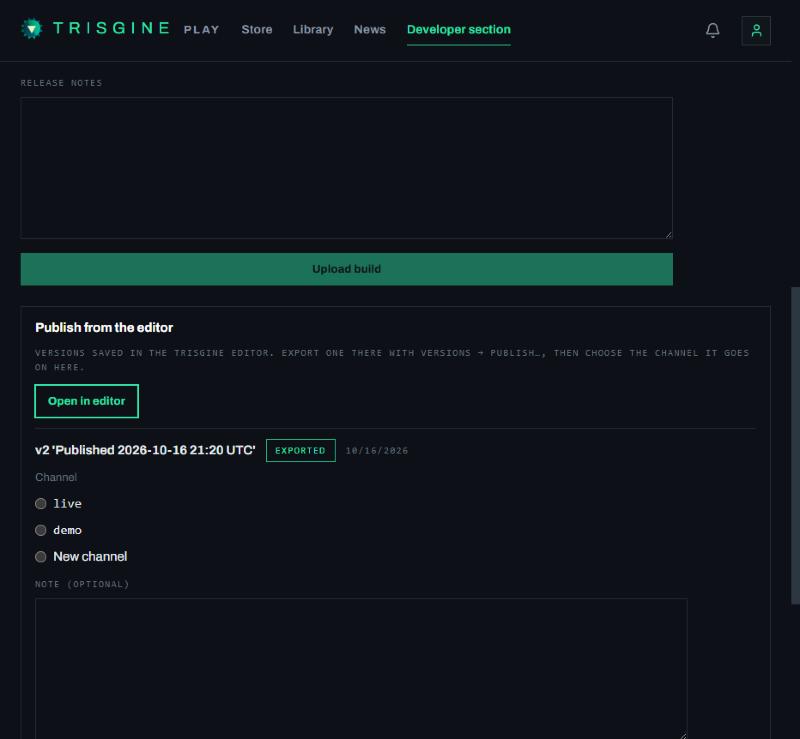
- Under Publish from the editor, find your version (Show saved versions lists them) and click Publish to…. Choose live, demo or New channel, add an optional note, and click Publish. The page shows "vN is on preview as vN-…" when the upload is done; it takes a little while for a ~20 MB build.
After a Publish, the editor shows that version read-only (a yellow bar: Viewing vN … (read-only)). Click Back to live to keep editing.
Upload a ZIP
If you have a build from somewhere else (for example a native or exported game):
| Field | Notes |
|---|---|
| Version | letters, digits, dot, hyphen or underscore, starting and ending with a letter or digit (e.g. 1.0.2) |
| Platform | web, vr, windows, linux, macos or android |
| Build archive | a ZIP of the build folder's contents; a web build needs index.html at its root |
| Release notes | optional |
Click Upload build. The limit is 30 MB per build by default.
Your first build
The first build a game gets also becomes its live build, so the reviewer has something to
play. Nobody else can play it until the game is approved and published.
Sharing a private channel
On Branches, each channel has a Play link. For a private channel the link carries its access key: anyone you give it to can play that build, even before release. Replace play key makes old links stop working. Make public opens the channel to everybody; Delete removes it.
Uploading from CI
On Branches, a private channel can have deploy tokens. Create one, store it as a masked
CI/CD variable, and paste the GitLab CI snippet the page generates: it zips your build folder
and uploads it to that channel on every pipeline. A token can never reach live or demo;
those change only when a person publishes.
Next: the store page →