Publishing on Trisgine Play
Create a game
Create a game draft on Trisgine Play, choose its address, and open it in the editor.
Create the draft
Games are created by an admin of the company or group (members can work on them, see Your team). A group or company that is still waiting for publishing rights can already create, build and edit games; it just can't submit them yet.
- In the Developer section, open your company or group, then Games (or New game on the Overview).
- Fill in the form:
| Field | Notes |
|---|---|
| Title | the name players see |
| Address | the game's web address, e.g. meadow-quest. Lowercase letters, digits and single hyphens. Type it yourself: it isn't filled in from the title. Once it is valid, the form previews the store-page and play addresses it gives. |
| Category | Adventure, Action, Puzzle or Simulation |
| Tagline | optional, one line under the title |
| Description | the store text |
- Click Create game. A message confirms "… created as a draft."
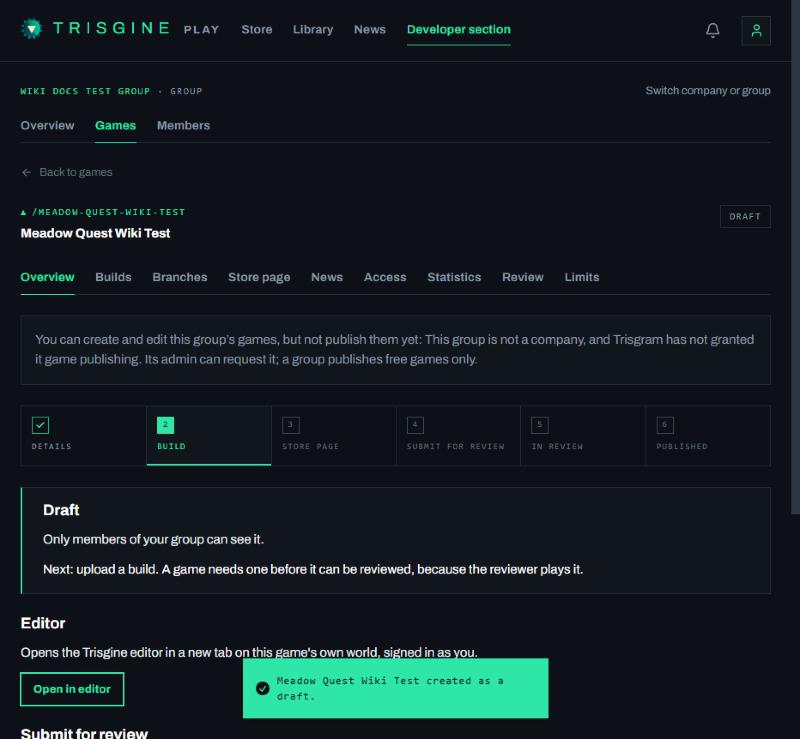
A draft is visible only to members of your company or group. The game's page has these tabs:
| Tab | For |
|---|---|
| Overview | progress, Open in editor, Submit for review |
| Builds | upload a build, publish one made in the editor, publish to live or demo |
| Branches | the channels (live, demo, your own) and CI deploy tokens |
| Store page | details, start screen, price, planned release, images, trailer, page theme |
| News | posts shown with the game |
| Access | who may play a paid game, and product keys (companies only) |
| Statistics | play statistics |
| Review | the listing status and Trisgram's latest note |
Open it in the editor
Open in editor on the Overview opens the Trisgine editor in a new tab, on this game's own world, already signed in as you. Build your game there.
Everything in the rest of this wiki, such as the 3D tutorial and Meadow Quest, works the same in a game's editor tab.
Next: builds and channels →